Sunday, April 28, 2024

C++ Pointers:


                  In C++, pointers are variables that store the memory 

                                 addresses of other variables.

Address in C++:

Every variable we declare in our program has an associated location in the memory, which we call the memory address of the variable.

If we have a variable var in our program, &var returns its memory address. For example,

#include <iostream>
using namespace std;

int main()
{
    // declare variables
    int var1 = 3;
    int var2 = 24;
    int var3 = 17;

    // print address of var1
    cout << "Address of var1: "<< &var1 << endl;

    // print address of var2
    cout << "Address of var2: " << &var2 << endl;

    // print address of var3
    cout << "Address of var3: " << &var3 << endl;
}

Output:

Address of var1: 0x7fff5fbff8ac
Address of var2: 0x7fff5fbff8a8
Address of var3: 0x7fff5fbff8a4

Here, 0x at the beginning represents the address in the hexadecimal form.

Notice that the first address differs from the second by 4 bytes, and the second address differs from the third by 4 bytes.

The difference is because the size of an int is 4 bytes in a 64-bit system.

Note: You may not get the same results when you run the program. This is because the address depends on the environment in which the program runs.

 I hope these resources help you a lot:     c++ features

C++ Pointers:

Here is how we can declare pointers:

int *point_var;

Here, we have declared a variable point_var which is a pointer to an int.

We can also declare pointers in the following way:

int* point_var; // preferred syntax


Assigning Addresses to Pointers:

Here is how we can assign addresses to pointers:

int var = 5;
int* point_var = &var;

Here, 5 is assigned to the variable var. And the address of var is assigned to the point_var pointer with the code point_var = &var.

Note: It is a good practice to initialize pointers as soon as they are declared.


Get the Value from the Address Using Pointers:

To get the value pointed by a pointer, we use the * operator. For example:

int var = 5;

// assign address of var to point_var
int* point_var = &var;

// access value pointed by point_var
cout << *point_var << endl;   // Output: 5

In the above code, the address of var is assigned to point_var. We have used the *point_var to get the value stored in that address.

When * is used with pointers, it's called the dereference operator. It operates on a pointer and gives the value pointed by the address stored in the pointer. That is, *point_var = var.

Note: In C++, point_var and *point_var are completely different. We cannot do something like *point_var = &var;. Here, point_var is a pointer that stores the address of variable it points to while *point_var returns the value stored at the address pointed by point_var.


Example 1: Working of C++ Pointers

#include <iostream>
using namespace std;
int main() {
    int var = 5;

    // store address of var
    int* point_var = &var;

    // print value of var
    cout << "var = " << var << endl;

    // print address of var
    cout << "Address of var (&var) = " << &var << endl
         << endl;

    // print pointer point_var
    cout << "point_var = " << point_var << endl;

    // print the content of the address point_var points to
    cout << "Content of the address pointed to by point_var (*point_var) = " << *point_var << endl;
    
    return 0;
}

Output:

var = 5
Address of var (&var) = 0x61ff08

point_var = 0x61ff08
Content of the address pointed to by point_var (*point_var) = 5
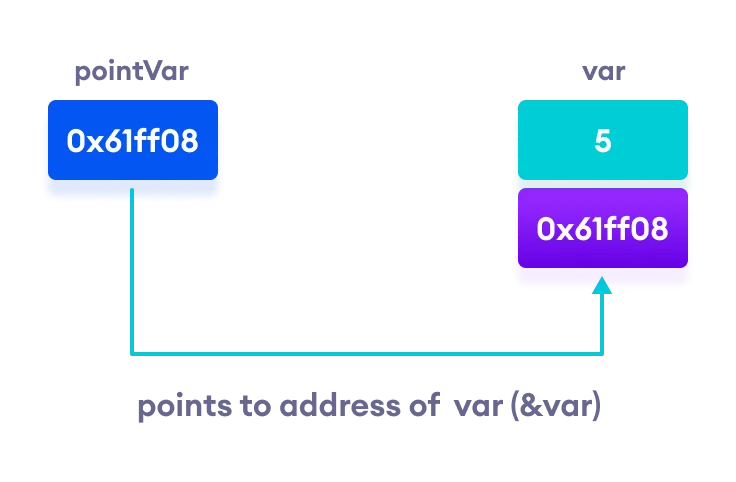
Working of C++ Pointers
Working of C++ pointers

Changing Value Pointed by Pointers:

If point_var points to the address of var, we can change the value of var by using *point_var.

For example,

int var = 5;
int* point_var = *var;

// change value at address point_var
*point_var = 1;

cout << var << endl; // Output: 1

Here, point_var and &var have the same address; the value of var will also be changed when *point_var is changed.


Example 2: Changing Value Pointed by Pointers

#include <iostream>
using namespace std;
int main() {
    int var = 5;

    // store address of var
    int* point_var = &var;

    // print var
    cout << "var = " << var << endl;

    // print *point_var
    cout << "*point_var = " << *point_var << endl
         << endl;

    cout << "Changing value of var to 7:" << endl;

    // change value of var to 7
    var = 7;

    // print var
    cout << "var = " << var << endl;

    // print *point_var
    cout << "*point_var = " << *point_var << endl
         << endl;

    cout << "Changing value of *point_var to 16:" << endl;

    // change value of var to 16
    *point_var = 16;

    // print var
    cout << "var = " << var << endl;

    // print *point_var
    cout << "*point_var = " << *point_var << endl;
    return 0;
}

Output:

var = 5
*point_var = 5

Changing value of var to 7:
var = 7
*point_var = 7

Changing value of *point_var to 16:
var = 16
*point_var = 16

Here point_var holds the address of var, and by dereferencing point_var with *point_var, we can access and modify the value stored at that address, which in turn affects the original variable var.


Common Mistakes When Working with Pointers:

Suppose we want a pointer point_var to point to the address of var. Then,

int var = 5;
// Wrong! 
// point_var is an address but var is not
int* point_var = var;

// Wrong!
// &var is an address
// *point_var is the value stored in &var
*point_var = &var;

// Correct! 
// point_var is an address and so is &var
point_var = &var;

 // Correct!
// both *point_var and var are values
*point_var = var

Saturday, April 27, 2024

Structure in c++:


Introduction:

C++ is a strong programming language that offers a scope of highlights to assist engineers with making proficient and coordinated code. One such component is the design, which permits engineers to gather related factors into a solitary unit. In this article, we will dive into the universe of designs in C++, investigating their definition, announcement, instatement, and use. We will likewise examine the advantages and restrictions of designs, as well as give models and best practices to working with them.


What is a Construction in C++?

A construction in C++ is a client characterized information type that permits designers to consolidate various factors of various information types into a solitary unit. This unit is known as a struct, and it can contain factors of any information type, including numbers, characters, strings, and, surprisingly, other structs. Structures are like classes, yet they have a few key contrasts, which we will examine later in this article.


Pronouncing a Design:

To pronounce a design in C++, you utilize the struct watchword followed by the name of the construction. For instance:

'''

struct MyStruct {

int x;

singe y;

};

'''

This proclaims a construction called MyStruct with two individuals: a number variable x and a person variable y.


Instating a Design


When a construction is pronounced, you can instate its individuals utilizing the spot administrator (.). For instance:

'''

myStruct;

myStruct.x = 10;

myStruct.y = 'A';

'''

This instates the x individual from the myStruct construction to 10 and the y part to 'A'.


Utilizing Designs


Designs can be utilized in different routes in C++. The following are a couple of models:


1. Function arguments: Designs can be passed as contentions to capabilities, permitting you to gather related information together.

2. Return types: Capabilities can return structures, making it simple to return different qualities from a capability.

3. Arrays: Designs can be utilized as components of clusters, permitting you to store and control a lot of information.

4. Pointers: Designs can be highlighted utilizing pointers, permitting you to apportion memory for structures powerfully.


Advantages of Designs:


Structures offer a few advantages in C++ programming, including:


1. Organization: Designs permit you to gather related information, making your code more coordinated and simpler to peruse.

2. Efficiency: Designs can lessen memory use by permitting you to store different qualities in a solitary unit.

3. Flexibility: Designs can contain factors of any information type, making them exceptionally adaptable.


Limits of Designs:

While structures are amazing assets in C++, they in all actuality do have a few constraints. The following are a couple:


1. No inheritance: Designs don't uphold legacy, and that implies you can't make a construction that acquires individuals from another design.

2. No polymorphism: Designs don't uphold polymorphism, and that implies you can't make numerous designs with a similar name yet various individuals.

3. No encapsulation: Designs don't uphold epitome, and that implies you can't conceal individuals from outside access.


Best Practices for Working with Designs:


The following are a couple of best practices to remember while working with structures in C++:


1. Use significant names: Utilize significant names for your designs and their individuals to make your code more lucid.

2. Use initialization: Introduce your designs when you proclaim them to keep away from indistinct way of behaving.

3. Use the spot operator: Utilize the dab administrator (.) to get to structure individuals, instead of the bolt administrator (- >).

4. Avoid complex structures: Try not to make complex designs with numerous individuals, as this can make your code harder to peruse and keep up with.


Conclusion:

All in all, structures are a strong component in C++ that permit designers to gather related factors into a solitary unit. They offer a few advantages, including association, proficiency, and adaptability, yet in addition have a few impediments, like no legacy, polymorphism, or exemplification. By following accepted procedures and utilizing structures prudently, designers can compose more productive and coordinated code. Whether you are a novice or an accomplished designer, dominating designs in C++ is a fundamental expertise to have in your tool stash.

You must exploir these resources:   functions in c++

Wednesday, April 24, 2024

Structures in c++:


We frequently come around circumstances where we want to store a gathering of information whether of comparable information types or non-comparable information types. We have seen Clusters in C++ which are utilized to store set of information of comparative information types at bordering memory areas.

Dissimilar to Exhibits, Designs in C++ are client characterized information types which are utilized to store gathering of things of non-comparable information types.


What is a construction?


A design is a client characterized information type in C/C++. A construction makes an information type that can be utilized to bunch things of potentially various sorts into a solitary kind.


Structures in C++:

A structure is a user-defined data type in C/C++. A structure creates a data type that can be used to group items of possibly different types into a single type. 


How to make a design?


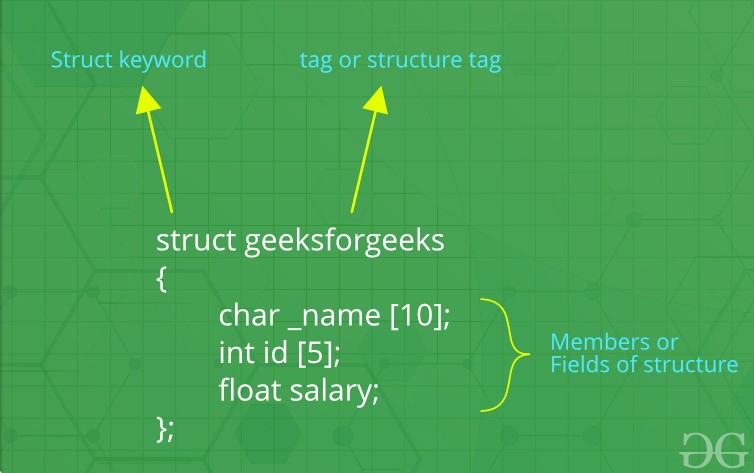
The 'struct' watchword is utilized to make a construction. The overall punctuation to make a design is as displayed beneath:


struct structureName{ member1;

    member2;
    member3;
    .
    .
    .
    memberN; 


Structures in C++ can contain two sorts of individuals:


Information Part: These individuals are typical C++ factors. We can make a design with factors of various information types in C++.

Part Works: These individuals are ordinary C++ capabilities. Alongside factors, we can likewise incorporate capabilities inside a design statement.

Example:  

// Data Members
int roll;
int age;
int marks;
     
// Member Functions
void printDetails()
{
    cout<<"Roll = "<<roll<<"\n";
    cout<<"Age = "<<age<<"\n";
    cout<<"Marks = "<<marks;
}

In the above structure, the data members are three integer variables to store roll number, age and marks of any student and the member function is printDetails() which is printing all of the above details of any student.


How to pronounce structure factors?


A construction variable can either be proclaimed with structure statement or as a different statement like fundamental sorts.


C++

// A variable declaration with structure declaration.
struct Point
{
   int x, y;
} p1;  // The variable p1 is declared with 'Point'
 
 
// A variable declaration like basic data types
struct Point
{
   int x, y;
};
 
int main()
{
   struct Point p1;  // The variable p1 is declared like a normal variable
}


Note: In C++, the struct watchword is discretionary before in statement of a variable. In C, it is obligatory.


How to instate structure individuals?

Structure individuals can't be instated with statement. For instance the accompanying C program flops in accumulation.

Be that as it may, is considered right in C++ 11 or more.


struct Point
{
   int x = 0;  // COMPILER ERROR:  cannot initialize members here
   int y = 0;  // COMPILER ERROR:  cannot initialize members here
};

The justification behind above blunder is straightforward, when a datatype is pronounced, no memory is designated for it. Memory is designated just when factors are made.


Structure individuals can be introduced with statement in C++. For Instance the accompanying C++ program Executes Effectively without tossing any Mistake.


// In C++ We can Initialize the Variables with Declaration in Structure.
 
#include <iostream>
using namespace std;
 
struct Point {
    int x = 0; // It is Considered as Default Arguments and no Error is Raised
    int y = 1;
};
 
int main()
{
    struct Point p1;
 
    // Accessing members of point p1
    // No value is Initialized then the default value is considered. ie x=0 and y=1;
    cout << "x = " << p1.x << ", y = " << p1.y<<endl;
   
    // Initializing the value of y = 20;
    p1.y = 20;
    cout << "x = " << p1.x << ", y = " << p1.y;
    return 0;
}
// This code is contributed by Samyak Jain
 x=0, y=1
 x=0, y=20

Structure members can be initialized using curly braces ‘{}’. For example, following is a valid initialization.

struct Point {
    int x, y;
};
 
int main()
{
    // A valid initialization. member x gets value 0 and y
    // gets value 1.  The order of declaration is followed.
    struct Point p1 = { 0, 1 };
}

  
How to access structure elements? 
Structure members are accessed using dot (.) operator. 

#include <iostream>
using namespace std;
 
struct Point {
    int x, y;
};
 
int main()
{
    struct Point p1 = { 0, 1 };
 
    // Accessing members of point p1
    p1.x = 20;
    cout << "x = " << p1.x << ", y = " << p1.y;
 
    return 0;
}
Output:
x = 20, y = 1

What is an array of structures?

Like other primitive data types, we can create an array of structures. 

#include <iostream>
using namespace std;
 
struct Point {
    int x, y;
};
 
int main()
{
    // Create an array of structures
    struct Point arr[10];
 
    // Access array members
    arr[0].x = 10;
    arr[0].y = 20;
 
    cout << arr[0].x << " " << arr[0].y;
    return 0;
}
Output:
10 20

  
What is a structure pointer?
 
Like primitive types, we can have pointer to a structure. If we have a pointer to structure, members are accessed using arrow ( -> ) operator instead of the dot (.) operator.

#include <iostream>
using namespace std;
 
struct Point {
    int x, y;
};
 
int main()
{
    struct Point p1 = { 1, 2 };
 
    // p2 is a pointer to structure p1
    struct Point* p2 = &p1;
 
    // Accessing structure members using
    // structure pointer
    cout << p2->x << " " << p2->y;
    return 0;
}
Output:
1 2

What is structure part arrangement?

In C++, a construction is equivalent to a class with the exception of a couple of contrasts. The most significant of them is security. A Construction isn't secure and can't conceal its execution subtleties from the end client while a class is secure and can conceal its customizing and planning subtleties. Find out about the distinctions among Designs and Class in C++.


last post

C language Vs C++ language in 2024

Popular Posts